Quickstart
This guide shows how to send your first analytics event directly to the devgrowthlab API.
There’s no SDK or tracking script - just one simple HTTPS POST request.
Each day the user opens your app or website, send an event to the devgrowthlab service. You don’t need to send more than one event a day.
1. Get your API key & endpoint
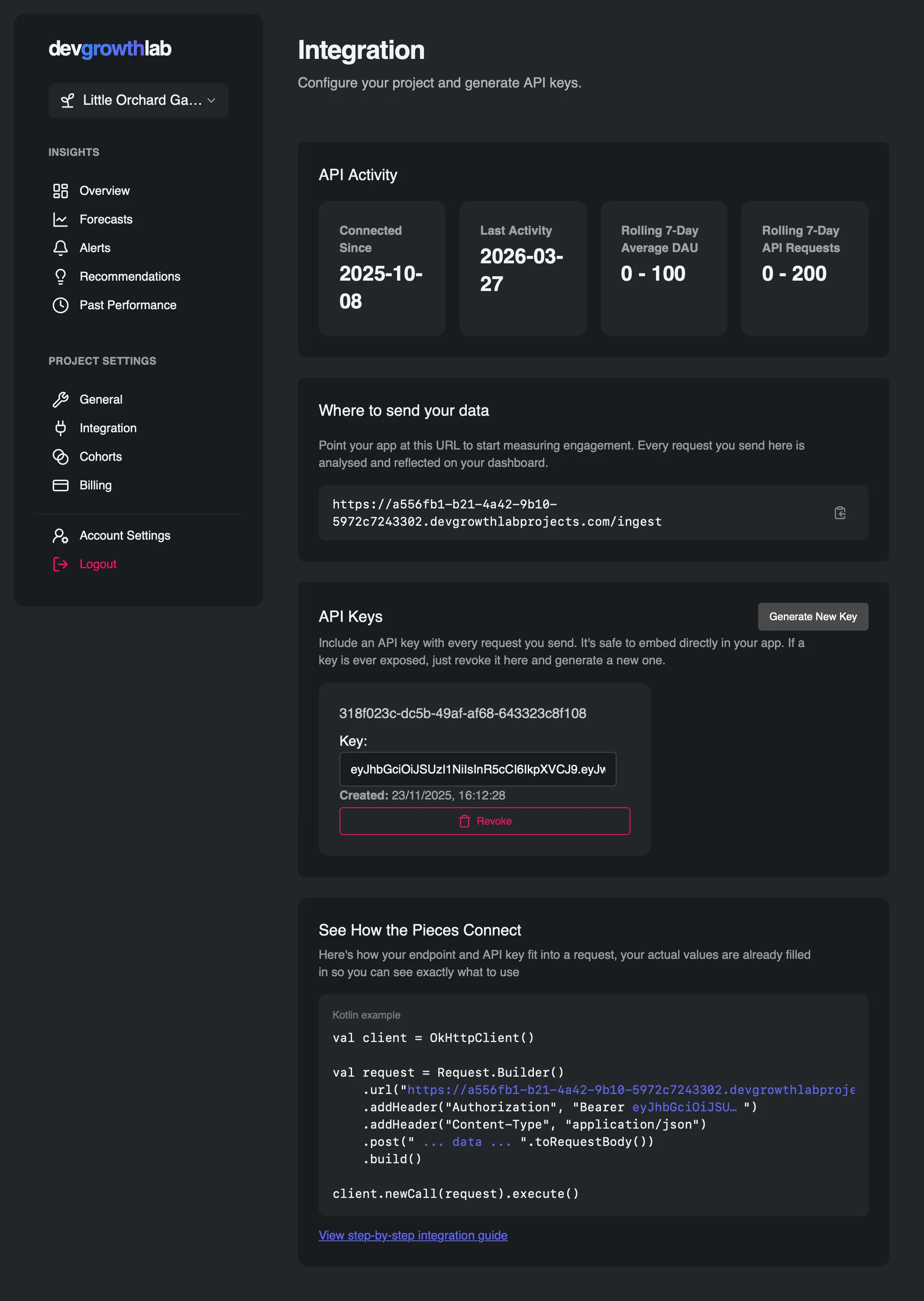
Section titled “1. Get your API key & endpoint”In your dashboard, go to Settings → Integration and copy your endpoint and API token (it should start with ey...).
Your endpoint will look like https://a556fb1-b21....devgrowthlabprojects.com/ingest
Your API key will start with ey..., we’ll use this in the Authorization header as Bearer ey....
2. Understand the request format
Section titled “2. Understand the request format”Request body:
{ "watermark": "string or \"none\"", "cohorts": { "Example Cohort": "Example Value" }}watermark: required. Pass the watermark returned by the previous request, or"none"the first time you call the service.cohorts: a simple map of strings to strings - you can use it to group users by plan, referrer, or experiment.
We’ll cover advanced cohorting later in the Guides section.
Response:
{ "nextWatermark": "string"}You must store this new nextWatermark securely and include it as watermark in the next request.
A watermark marks how far processing has got. It records what devgrowthlab has already recorded in previous API calls,
so the next request only adds what’s new, and the service doesn’t duplicate records or count the user as a
fresh install on every app open. It isn’t an identifier and doesn’t identify the user.
3. Send your first event
Section titled “3. Send your first event”Choose your preferred framework below and copy the example into your project.
const response = await fetch("https://<projectid>.devgrowthlabprojects.com/ingest", {    method: "POST",    headers: {        "Authorization": "Bearer YOUR_JWT_TOKEN",        "Content-Type": "application/json"    },    body: JSON.stringify({        watermark: localStorage.getItem("devgrowthlab_watermark") || "none",        cohorts: {            // See the guide on cohorts for more info            "Example Cohort": "Example Value"        }    })});
const data = await response.json();if (data.nextWatermark) { // ⚠️ Store the new watermark securely // Note: it's best to store this in your own backend for the user, unless you have consent for cookies and local storage. localStorage.setItem("devgrowthlab_watermark", data.nextWatermark);}import Foundation
let url = URL(string: "https://<projectid>.devgrowthlabprojects.com/ingest")!var request = URLRequest(url: url)request.httpMethod = "POST"request.setValue("Bearer YOUR_JWT_TOKEN", forHTTPHeaderField: "Authorization")request.setValue("application/json", forHTTPHeaderField: "Content-Type")
let watermark = UserDefaults.standard.string(forKey: "devgrowthlab_watermark") ?? "none"let payload: [String: Any] = [ "watermark": watermark, "cohorts": [ "Example Cohort": "Example Value" ]]
request.httpBody = try? JSONSerialization.data(withJSONObject: payload)
URLSession.shared.dataTask(with: request) { data, _, error inguard let data = data, error == nil else { return }if let json = try? JSONSerialization.jsonObject(with: data) as? [String: Any], let nextWatermark = json["nextWatermark"] as? String { UserDefaults.standard.set(nextWatermark, forKey: "devgrowthlab_watermark")}}.resume()import retrofit2.Callimport retrofit2.http.Bodyimport retrofit2.http.Headerimport retrofit2.http.POST
data class IngestRequest( val watermark: String, val cohorts: Map<String, String>)
data class IngestResponse(val nextWatermark: String)
interface DevgrowthlabApi {@POST("api/ingest") fun ingest( @Header("Authorization") auth: String, @Body body: IngestRequest ): Call<IngestResponse>}
// Usageval prefs = context.getSharedPreferences("devgrowthlab", Context.MODE_PRIVATE)val watermark = prefs.getString("devgrowthlab_watermark", null) ?: "none"
val request = IngestRequest( watermark, mapOf( // See the guide on cohorts for more info "Example Cohort" to "Example Value" ))
val api = Retrofit.Builder() .baseUrl("https://devgrowthlab.com/") .build() .create(DevgrowthlabApi::class.java)
api.ingest("Bearer YOUR_JWT_TOKEN", request).enqueue(object: Callback<IngestResponse> { override fun onResponse(call: Call<IngestResponse>, response: Response<IngestResponse>) { response.body()?.nextWatermark?.let { prefs.edit().putString("devgrowthlab_watermark", it).apply() } } override fun onFailure(call: Call<IngestResponse>, t: Throwable) { t.printStackTrace() }})import okhttp3.*;
OkHttpClient client = new OkHttpClient();MediaType JSON = MediaType.parse("application/json; charset=utf-8");
String watermark = preferences.getString("devgrowthlab_watermark", "none");String json = "{\"watermark\":\"" + watermark + "\"" + ",\"cohorts\":{\"Example Cohort\":\"Example Value\"}}";
RequestBody body = RequestBody.create(json, JSON);Request request = new Request.Builder() .url("https://<projectid>.devgrowthlabprojects.com/ingest") .addHeader("Authorization", "Bearer YOUR_JWT_TOKEN") .post(body) .build();
client.newCall(request).enqueue(new Callback() { public void onResponse(Call call, Response response) throws IOException { String resp = response.body().string(); JSONObject obj = new JSONObject(resp); String nextWatermark = obj.getString("nextWatermark"); preferences.edit().putString("devgrowthlab_watermark", nextWatermark).apply(); }
public void onFailure(Call call, IOException e) { e.printStackTrace(); }});import 'package:http/http.dart' as http;import 'dart:convert';import 'package:shared_preferences/shared_preferences.dart';
Future void> sendEvent() async { final prefs = await SharedPreferences.getInstance(); final watermark = prefs.getString("devgrowthlab_watermark") ?? "none";
final response = await http.post( Uri.parse("https://<projectid>.devgrowthlabprojects.com/ingest"), headers: { "Authorization": "Bearer YOUR_JWT_TOKEN", "Content-Type": "application/json" }, body: jsonEncode({ "watermark": watermark, "cohorts": {"Example Cohort": "Example Value"} }), );
if (response.statusCode == 200) { final body = jsonDecode(response.body); await prefs.setString("devgrowthlab_watermark", body["nextWatermark"]); } else { print("Failed: ${response.statusCode}"); }}4. Verify your data
Section titled “4. Verify your data”Go back to your dashboard, under Settings → Integration last ingestion should now list the current date. It may take a few moments to process.
5. Optional: Setup your existing app
Section titled “5. Optional: Setup your existing app”If you have an existing app with a large cohort of existing users then it’s recommended to send additional information to the service at first so the devgrowthlab can accurately model the retention curve for your app. Follow the guide here.